
Hard Disk Serial Number Changer: Best Tools on the Market


 6 min. read
  Updated on
Here are the best tools that’ll help you safely change the serial number of your PC.
Remember, only do this within the limits of your system’s intended use and legal boundaries. Many games and licensing systems rely on your hard disk or volume serial number for identification.
This list covers reliable tools to modify serial numbers safely, with clear instructions and usage tips.
How to Change and Spoof Your Hard Disk Serial Numbers
Finding Your Current Volume Serial Number
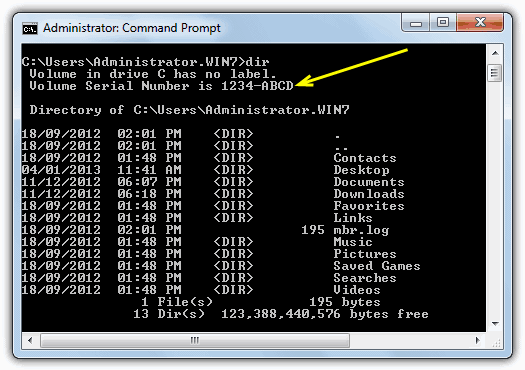
A straightforward method to view your current volume serial number is by using the Command Prompt:
- Press Win+R, type
cmd, and hit Enter. - At the prompt, type
dirand press Enter. - The second line shows the volume serial number for the C: partition. (Typing dir [driveletter:] will display a different serial—even on the same physical drive.)
Note: The volume serial number changes every time you format a partition. Because Windows uses this value during activation, moving an activated installation to a new partition may require reactivation.
Tools for Changing the Volume and Hard Disk Serial Numbers
Below are several tools—each with distinct capabilities—that allow you to change the volume serial number or spoof the hard disk’s built-in serial number.
1. Hard Disk Serial Number Changer
This free, portable tool is designed to change the volume serial number (not the hard-coded hardware serial number). It works on nearly every Windows version since 98. (On Vista and Windows 7, you must run it as an administrator.)
- Usage:
Select your drive from the drop-down box, enter the new serial (formatted as eight hexadecimal characters split into two groups by a hyphen, e.g.,1A2B-3C4D), and click Change. A reboot is required to commit the changes.
Download Hard Disk Serial Number Changer
2. VolumeID (Sysinternals)
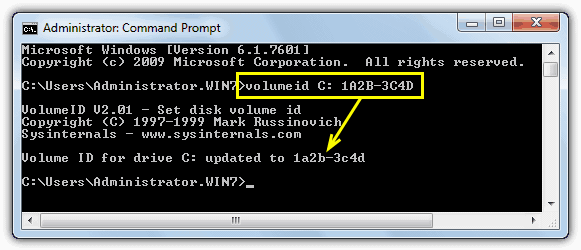
VolumeID is a command-line tool by Sysinternals that lets you change the volume serial number. Although it might not be as user-friendly as graphical alternatives, it is a reliable option.
- Usage:
Open a Command Prompt and run:cssCopyEditvolumeid [driveletter:] xxxx-xxxx(Replacexxxx-xxxxwith the desired serial in hex format.)
Make sure to close all running applications before changing the serial and reboot if the drive is NTFS.
Download Sysinternals VolumeID
After making these changes, you might want to ensure that your system’s performance remains optimal. For that, consider checking out our review of the HD Tune Hard Disk Utility & Benchmark Tool.
3. PB DownForce
PB DownForce is a free tool that temporarily spoofs your hard drive’s built-in serial number.
It works on Windows XP and Windows 7 (32-bit only); note that 64-bit Windows is not supported by the free spoofing tools we’ve found.
- Usage:
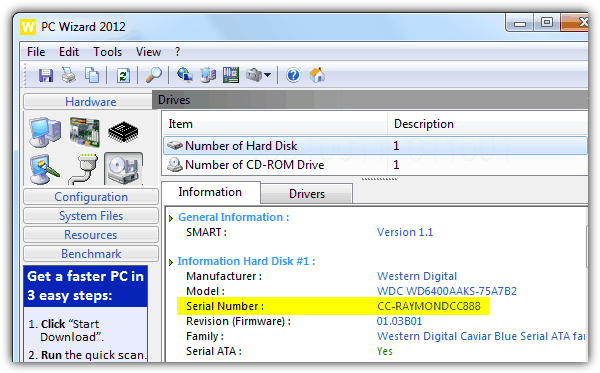
Run the tool as an administrator and click the Start spoofing button. Advanced options let you choose between different spoofing methods. When testing, tools like PC Wizard, Speccy, and HWInfo might show varying results—some displaying the spoofed value, others the original.
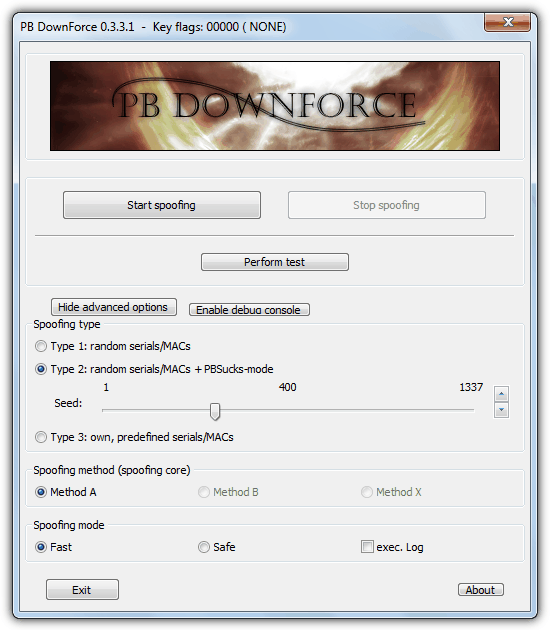
After spoofing, a utility such as PC Wizard may reveal a new serial number:
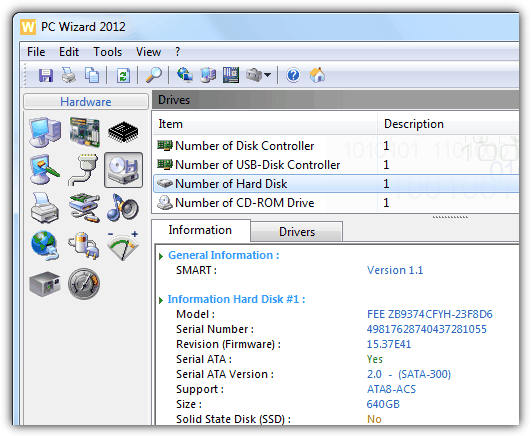
Remember, the spoofed serial resets on reboot.
4. Hardware Spoofer
HWSpoofer is an older tool (compatible with Windows 2000/XP) that spoofs the hard disk’s built-in serial number and even attempts to spoof your network adapter’s MAC address.
It runs without a graphical interface—simply execute the program to patch the system.
An INI file is created in the same folder to store spoofing details; delete this file to generate new numbers.
Caution: Re-running the tool without a reboot may lead to blue screens or crashes.
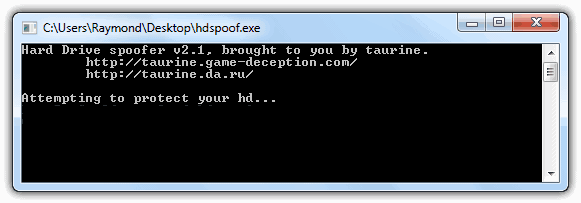
5. Object Tree
Object Tree offers an alternative approach by hiding your drives and network adapters completely rather than spoofing their serial numbers.
This can be especially useful if you need to make certain drives invisible to specific software or for security purposes.
- Usage:
Open Object Tree, expand[ROOT] -> GLOBAL??, select PhysicalDrive0, and click Hide. Alternatively, choose Hide all PB related symbolic links from the File menu. To reveal hidden drives, select Unhide all entries from the File menu.
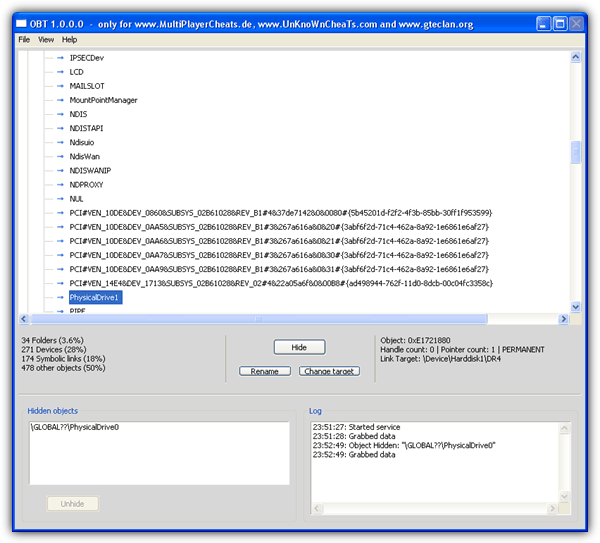
6. Chameleon
Chameleon is a hardware ID spoofing tool designed for Windows 7 and Windows 8 (32-bit).
It operates in kernel mode (Ring 0) to change both the hard drive’s built-in serial number and the MAC address on network adapters. (Support for 64-bit systems is expected in a future release.)
- Usage:
- After purchase, create a forum account and upgrade it to VIP via the web control panel.
- Download the software and run the Loader as administrator. This generates a hardware information text file.
- Access the control panel’s Update HardwareID section and enter all five fields from the hardware information file. A
license.datfile is then provided—place it in the same folder as the Loader. - Rename
Loader.exe(for example, toraymond.exe), and then run it as administrator. - A
Setup.inifile will be generated; open it with Notepad and replaceNULLwith your desired spoofed serial number (keeping the exact same length). - Save the file and run the software again. When you see the message “Chameleon has been loaded successfully,” your hard disk serial number has been spoofed.
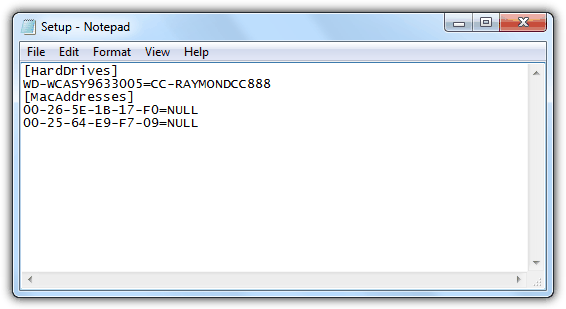
Special Note
Because these tools hook Windows functions at a very low level (Ring 0), they behave rather like rootkits in the eyes of security software.
Your antivirus program may flag PB DownForce, HWSpoofer, and similar tools as trojans. You might need to explicitly allow them or temporarily disable your antivirus while using these tools.
If you’re planning more extensive modifications or require further system cleanup afterward, you might find our guides on Disk Wipe Bootable USB Tools: 9 Best to Use in 2023 and MBR Repair & Backup Tools: 11 Best We Tested in 2023 useful.
Conclusion
Learn how to benchmark your drives with the Best Free SSD Benchmark Tool to Test Storage Performance, or explore system maintenance and repair with our guides on HD Tune Hard Disk Utility & Benchmark Tool and MBR Repair & Backup Tools.
For those who need to securely erase data, our guide on Disk Wipe Bootable USB Tools may be just what you need.
Use these tools responsibly and always verify compatibility with your system before proceeding with any modifications.



Improve this guide

User forum
41 messages